
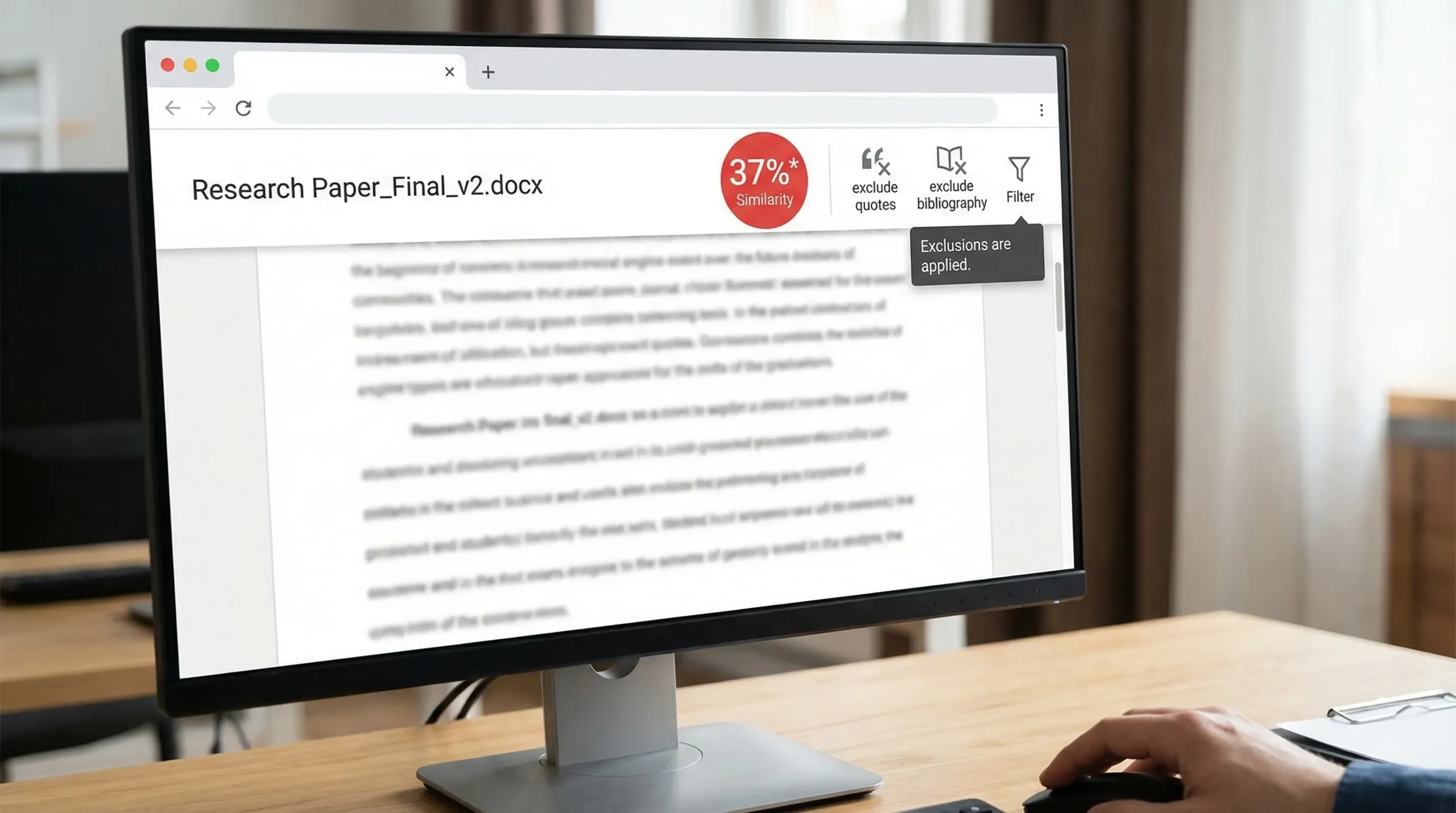
Seeing something like “18%*” inside Turnitin can be confusing, especially if you have never noticed the asterisk before. The good news is that the asterisk usually does not mean a secret penalty or an “AI detected” flag.
Want to bypass Turnitin in 2026? Grab the free prompt pack.
Get the exact text-humanization prompts I use to drop an AI score by hand — copy, paste, submit. Free, straight to your inbox.
Send me the free prompts →In most Turnitin interfaces, the asterisk next to the similarity percentage indicates the score you’re looking at is not the raw, default Similarity Index, because filters or exclusions have been applied (for example, excluding bibliography, quotes, or small matches), or specific sources have been manually excluded from the Similarity Report.
What the Turnitin percentage actually measures — What Does the Turnitin Asterisk % Mean (Explained)
Turnitin’s percentage is part of the Similarity Report, not a “plagiarism score.” It shows how much of your submitted text matches content in Turnitin’s comparison databases.
A similarity match can come from:
- Properly quoted material
- Your reference list / bibliography
- Common phrases, templates, or assignment instructions
- Legitimate reuse (for example, a methods section with standard phrasing)
- Poor paraphrasing or missing citations
- Copy-pasted text (the scenario most people worry about)
Turnitin itself emphasizes that the Similarity Report is a matching tool, and educators must interpret it in context (not all matches are misconduct). You can read Turnitin’s general explanation in their help documentation: Turnitin guidance on Similarity Reports.
What does the Turnitin asterisk % mean?
When Turnitin shows a similarity score with an asterisk (for example, “18%*”), it typically means:
- The similarity percentage shown is based on the current filtered view of the report, not the default view.
- One or more exclusions are active (quotes, bibliography, small matches), and the displayed number reflects those settings.
- In some instructor workflows, it can also appear when sources have been excluded after review.
In plain English: the asterisk is a hint that the score has been altered by report settings, so it is not the unfiltered “baseline” similarity value.
Why Turnitin uses an asterisk at all
Turnitin reports can be viewed in multiple “states.” If someone turns on exclusions, the tool needs a way to signal:
- “This number is conditional.”
- “You’re seeing similarity with some matches removed from the calculation.”
The asterisk is one of the visual cues Turnitin uses for that.
The most common exclusions that trigger the asterisk
Depending on your institution’s Turnitin product and settings, the asterisk often shows up when one or more of these are enabled:
Excluding the bibliography or references
If your references are formatted normally, Turnitin can match them to many other papers and websites. Excluding the bibliography can lower the visible score, and Turnitin may mark the adjusted score with an asterisk.
Excluding quoted material
Quotes (even properly cited ones) still match. Excluding quotes removes those matches from the displayed similarity calculation.
Excluding small matches
Some instructors exclude matches below a word count or percentage threshold (for example, ignoring tiny fragments that are likely incidental).
Excluding specific sources
An instructor might exclude a source that is irrelevant, such as:
- The assignment template
- A required rubric text
- A class handout that everyone must submit with the paper
Once excluded, the report view changes, and the score may show an asterisk to indicate it.
How to confirm what the asterisk refers to (quick checks)
Turnitin’s interface varies by version (Feedback Studio, Similarity Report view inside an LMS, etc.), but these checks are usually reliable:
1) Look for “Filters” or “Exclusions” in the Similarity panel
Open the Similarity Report and find a control labeled something like:
- Filters and Settings
- Exclude
- View excluded sources
If any exclusions are enabled, that is the most likely reason for the asterisk.
2) Hover for a tooltip (if available)
Many Turnitin UI elements show a tooltip when you hover over the similarity badge. If you see the asterisk, hovering often reveals a short explanation indicating the score is based on exclusions.
3) Toggle exclusions on and off
If you have permission to adjust settings, toggle exclusions (bibliography, quotes, small matches) and watch whether:
- The percentage changes
- The asterisk appears or disappears
If you are a student and can’t change these settings, your instructor may have them set globally.
Asterisk % vs AI detection in Turnitin: they are different
A very common misunderstanding is that the asterisk has something to do with AI writing detection.
- The Similarity percentage (with or without an asterisk) relates to text matching.
- Turnitin’s AI writing indicator (if your institution has it enabled) is a separate feature and is presented separately from similarity.
So, “18%*” is about similarity view settings, not an AI probability score.
Does a lower asterisk score mean you are “safe”?
Not automatically.
A filtered similarity score can be useful, but it can also hide important context if misused. For example:
- Excluding quotes and references is normal for interpreting writing originality.
- Excluding too much can make a report look cleaner than it really is.
Many instructors will still review:
- The match breakdown
- Where the matched text appears
- Whether sources are cited correctly
- Whether the writing shows original analysis
How to interpret a Turnitin similarity percentage (with context)
There is no universal “good” number that applies everywhere. The acceptable similarity level depends on the assignment type, discipline, and instructor policy.
Here is a practical interpretation framework (not a rulebook):
| Similarity outcome | What it often means | What to do next |
|---|---|---|
| Very low similarity | Either highly original writing or not many comparable sources | Still check citations and paraphrasing quality |
| Moderate similarity | Typical mix of citations, common phrasing, and a few matches | Review the biggest matches and ensure correct attribution |
| High similarity concentrated in a few blocks | Often indicates copy-paste, patchwriting, or heavy template reuse | Rewrite those sections, cite properly, add original analysis |
| High similarity spread across many small matches | Could be common phrases or over-reliance on source wording | Improve paraphrasing, sentence structure, and synthesis |
The key is not the single number, but what the matches are.
The right way to reduce similarity (without creating integrity problems)
If your score is higher than expected, focus on fixes that improve real originality.
Strengthen citations and quoting (the “clean” fixes)
- Put copied text in quotation marks when appropriate.
- Cite the exact source close to the borrowed idea, not only at the end of a paragraph.
- Ensure your reference list matches your in-text citations.
Replace patchwriting with genuine paraphrasing
Patchwriting is when you keep the source’s structure and just swap words. Turnitin can still match that, and instructors often recognize it.
A better approach:
- Read the source, then close it.
- Write the idea in your own structure (different order, different emphasis).
- Add your own interpretation or connection to your argument.
Add original analysis (the fastest way to “earn” originality)
Similarity drops naturally when you include:
- Your reasoning
- Your examples
- Your critique
- Your comparison of multiple sources
Even in research-heavy papers, original analysis is usually what instructors grade most heavily.
Use rewriting tools ethically (and carefully)
If you use AI tools to improve clarity, grammar, or tone, treat them like editing help, not a shortcut to submit work you didn’t produce.
For students who are worried about being misread by automated systems, tools that help you rewrite into a more natural voice can reduce awkward, repetitive phrasing that sometimes triggers suspicion. If you want to explore that responsibly, Detection Drama maintains free resources and tools focused on making AI-assisted drafts sound more human and authentic: DetectionDrama.com.
Important: No tool can guarantee a “pass” in every Turnitin setup, and using tools to misrepresent authorship may violate your institution’s academic integrity policy.
Common misconceptions about the asterisk score
“The asterisk means Turnitin found plagiarism.”
Not by itself. The asterisk usually means the score is filtered.
“The asterisk means Turnitin detected AI.”
No. Similarity and AI writing indicators are separate.
“0% means my work is original.”
Not necessarily. It can mean Turnitin didn’t find matches in its databases. Instructors can still identify poor citation practices or contract cheating through other signals.
“A high score always means cheating.”
Not always. A literature review, a legal memo with standard language, or a lab report with a shared method can produce a high similarity score while still being legitimate.
If you’re an instructor: how to explain the asterisk to students
Confusion around “%*” is common. A clear policy helps.
Consider telling students:
- Similarity is for review, not an automatic accusation.
- Whether you evaluate the filtered or unfiltered score.
- What you exclude (quotes, bibliography, small matches) and why.
- What they should do if they believe a match is incorrect.
Frequently Asked Questions
What does the Turnitin asterisk % mean? It usually means the displayed similarity percentage is based on a filtered view of the Similarity Report, with exclusions applied (like bibliography, quotes, small matches, or excluded sources).
How do I see what was excluded in Turnitin? Open the Similarity Report and look for a “Filters” or “Exclusions” area. Depending on permissions, you can view excluded sources, toggle exclusions, or ask your instructor what settings are active.
Is the asterisk related to Turnitin AI detection? No. The asterisk next to the similarity percentage relates to similarity filtering. Turnitin’s AI writing indicator (if enabled) is presented separately.
Which score matters, the one with the asterisk or without it? Instructors decide. Many review both: the unfiltered similarity for full context and the filtered similarity to avoid counting references or quotes.
Can I lower my Turnitin similarity score ethically? Yes. Improve paraphrasing, cite sources correctly, use quotes when needed, and add original analysis. Avoid copy-pasting and patchwriting.
Want clearer, more human-sounding writing (without guesswork)?
If you’re revising a draft and want it to read more naturally, Detection Drama offers free tools and guides to help transform AI-assisted text into writing that sounds authentically human. Start here: DetectionDrama.com.
