
Group projects are supposed to spread the workload. In 2026, they also spread risk. If one teammate pastes in AI-written paragraphs (or even over-edits with tools like Grammarly), your final submission can trigger Turnitin AI flags and the whole group may get questioned.
Want to bypass Turnitin in 2026? Grab the free prompt pack.
Get the exact text-humanization prompts I use to drop an AI score by hand — copy, paste, submit. Free, straight to your inbox.
Send me the free prompts →This guide is about protecting yourself ethically: building a collaboration trail, reducing false-positive triggers, and preparing evidence of authorship so you are not stuck defending work you did not write.
Group Project Turnitin AI Flags: Why group projects get Turnitin AI flags more often
Turnitin’s AI indicator is not a “lie detector.” It is a probability signal based on patterns in text. That matters in group work because group writing naturally creates patterns that can look “machine-like,” even when everyone is acting in good faith.
Common group-project factors that increase AI-flag risk:
Last-minute paste-ins: Large blocks added right before submission often look unlike the surrounding draft history.
Voice mismatch: A paper that shifts from casual to formal to highly polished can look algorithmically “assembled.”
Over-standardized structure: If you all follow the same template paragraph after paragraph, it can resemble generated prose.
Heavy proofreading tools: Aggressive rewriting and smoothing can remove personal quirks that signal human drafting.
ESL and “over-correct” writing: Non-native patterns and hyper-formal phrasing can be misread by detectors (Detection Drama has a research summary on AI detection bias against ESL students).
If your team’s goal is “make it sound perfect,” you can accidentally converge on the very uniformity detectors associate with AI.
What Turnitin actually shows (and why this matters for teams)
In most instructor views, Turnitin presents:
A Similarity report (text matches against sources)
An AI writing indicator (a separate signal based on authorship likelihood)
Those are different systems, and they can move independently. If you want a clear explanation for your team, share this internal reference: Turnitin AI % vs Similarity %: what’s actually different?
Also important for group projects: instructors typically see what Turnitin provides inside their interface, not a hidden “real score.” If your teammate insists the teacher can see some secret number, send them: Can teachers see your real Turnitin AI percentage?
For Turnitin’s own positioning, you can also review their AI writing FAQ and limitations on the vendor site: Turnitin AI writing detection overview (high level, but useful when you need to cite the tool’s intent and constraints).
The best protection is a paper trail, not a “lower AI score”
When students ask “group project, how protect yourself from AI flags?”, the safest answer is not a magical rewrite. It is process evidence.
If you can show a normal human workflow (incremental drafting, feedback, revisions, sources, and division of labor), a questionable AI indicator becomes easier to contextualize.
Think in two layers:
Prevention: reduce avoidable triggers and keep clean collaboration records.
Defense: if flagged, you can quickly produce an authorship packet that separates your work from a teammate’s.
Before you write: set rules that your future self will thank you for
1) Read the actual course policy together (don’t assume)
In 2026, “AI allowed” can mean anything from “brainstorming only” to “drafting allowed with disclosure” to “no AI tools at all.” Your group needs a shared interpretation.
Do this early:
Screenshot or copy the syllabus AI policy into the project folder.
If unclear, email the instructor as a group and ask what is allowed.
Agree on what tools count as AI assistance (LLMs, paraphrasers, grammar rewriters, translation, citation generators).
If your policy requires disclosure, decide where disclosure lives (cover page, appendix, comments, or a process memo).
2) Create a simple team “authorship agreement”
You do not need legal language. You need clarity.
Here is a practical agreement format you can paste into your doc header:
Allowed tools: (example) spellcheck, citation manager, basic grammar suggestions.
Not allowed without group approval: AI drafting of paragraphs, paraphrasing tools that rewrite meaning, last-minute paste-ins.
Required if AI is used: disclose what was used, keep prompts/outputs, and rewrite in your own words.
Submission rule: no one adds more than a short paragraph in the final 12 hours without notifying the group.
This sounds strict, but it prevents the classic scenario where one teammate “fixes everything” at 2 a.m. and the whole paper gets flagged.
3) Choose collaboration tools that automatically document contributions
Pick tools that produce defensible logs.
Recommended setups (choose one):
Google Docs with version history and named versions
Microsoft Word on OneDrive/SharePoint with version history and Track Changes
A shared folder (Drive/OneDrive) for sources, drafts, meeting notes, and exports
If you want the nuance: version history helps, but it is not perfect proof. This deep dive explains what it can and cannot show: Is Google Docs or Word version history enough as proof?
4) Assign “section ownership” so responsibility is traceable
Group papers often fail defensibility because “everyone edited everything.” That may be true, but it is hard to prove.
Instead, define owners:
Each major section has a primary writer.
Others can comment and suggest edits.
Major rewrites require the owner’s approval.
This structure creates a clean narrative if you ever need to explain who wrote what.
Make the paper assignment-specific (generic is risky)
Detectors tend to be more suspicious of text that reads like a general internet explanation. Group projects become safer when you add the details AI usually lacks.
Add:
- Course-specific terminology used in class
- References to your dataset, lab, interview, local case, or assigned reading
- Small limitations, trade-offs, or uncertainties (real student work is rarely “perfect”)
- Concrete numbers and decisions your group made (and why)
Avoid “uniform perfection” across the whole document
Turnitin flags often come from patterns like consistent sentence length, overly smooth transitions, and repetitive structure.
If you want a checklist of normal habits that can unintentionally trigger flags, see: Normal writing habits that can trigger Turnitin AI flags
Practical fixes that stay ethical:
- Vary sentence length naturally.
- Replace filler transitions with specific claims.
- Add your group’s reasoning steps (what you considered, what you rejected).
- Keep some human texture (not slang, just authentic phrasing and cadence).
Be careful with “helpful” rewriting tools
Grammar tools are common in group projects because teams want a consistent voice. But heavy rewriting can backfire.
If Grammarly (or similar tools) are part of your workflow, read this first: Grammarly triggered Turnitin AI: how to prove authorship
A safer editing approach:
- Use tools for spelling, punctuation, clarity, not full-sentence rewrites.
- Prefer comment-based editing (“this sentence is unclear”) over replacing whole paragraphs.
- Keep intermediate drafts. Do not overwrite everything into one “final perfect” version.
Group Project Turnitin AI Flags: Keep a contribution log (this protects you if a teammate causes the problem)
A contribution log is simple and powerful. It turns “I wrote my part” into evidence.
Use a table like this in your shared folder (or in an appendix doc):
| Date | Member | What changed | Where (section/page) | Evidence link (version, file, screenshot) |
|---|---|---|---|---|
| 2026-03-10 | Alex | Drafted intro + problem statement | 1.1–1.2 | Google Doc version “Intro draft” |
| 2026-03-12 | Sam | Added 5 sources + annotated notes | References | /Sources/annotated-bib.docx |
| 2026-03-15 | Jordan | Revised methodology and added limitations | 2.0–2.4 | Version history + meeting notes |
You are not doing this to “snitch.” You are doing it so that if the document is questioned, you can separate legitimate drafting from suspicious paste-ins.
Pre-submission: a safe “AI flag risk audit” for group work
Step 1: lock the draft and export a snapshot
Before anyone starts polishing:
- Name a version in Google Docs (“Pre-edit lock”).
- Export a PDF and keep it in /Exports.
If later changes cause issues, you can show the evolution.
Step 2: do a human review pass (out loud works)
A surprisingly effective group tactic is reading the document out loud during a final meeting. You catch:
- Paragraphs that sound unlike the rest of the paper
- Overly generic sections
- “Perfect” phrasing that no one in the group can explain
If someone cannot explain what a paragraph means, that paragraph is a liability.
Step 3: understand that detector scores are not an objective target
Teams sometimes panic and try to “optimize the AI score.” This can make things worse.
- Rewriting purely to lower detection can distort meaning, reduce citations, or create unnatural patterns.
- If AI drafting is prohibited, actively trying to evade detection can escalate an integrity review.
If you still want a pre-submission signal check (especially to spot accidental false positives), use it as a diagnostic, not a goal. Detection Drama offers tools and guides designed for analysis and style improvement, including instant access options on the homepage: DetectionDrama tools.
If you choose to use any humanization or rewriting tool, do it only on text you authored, keep drafts, and follow your course disclosure rules.
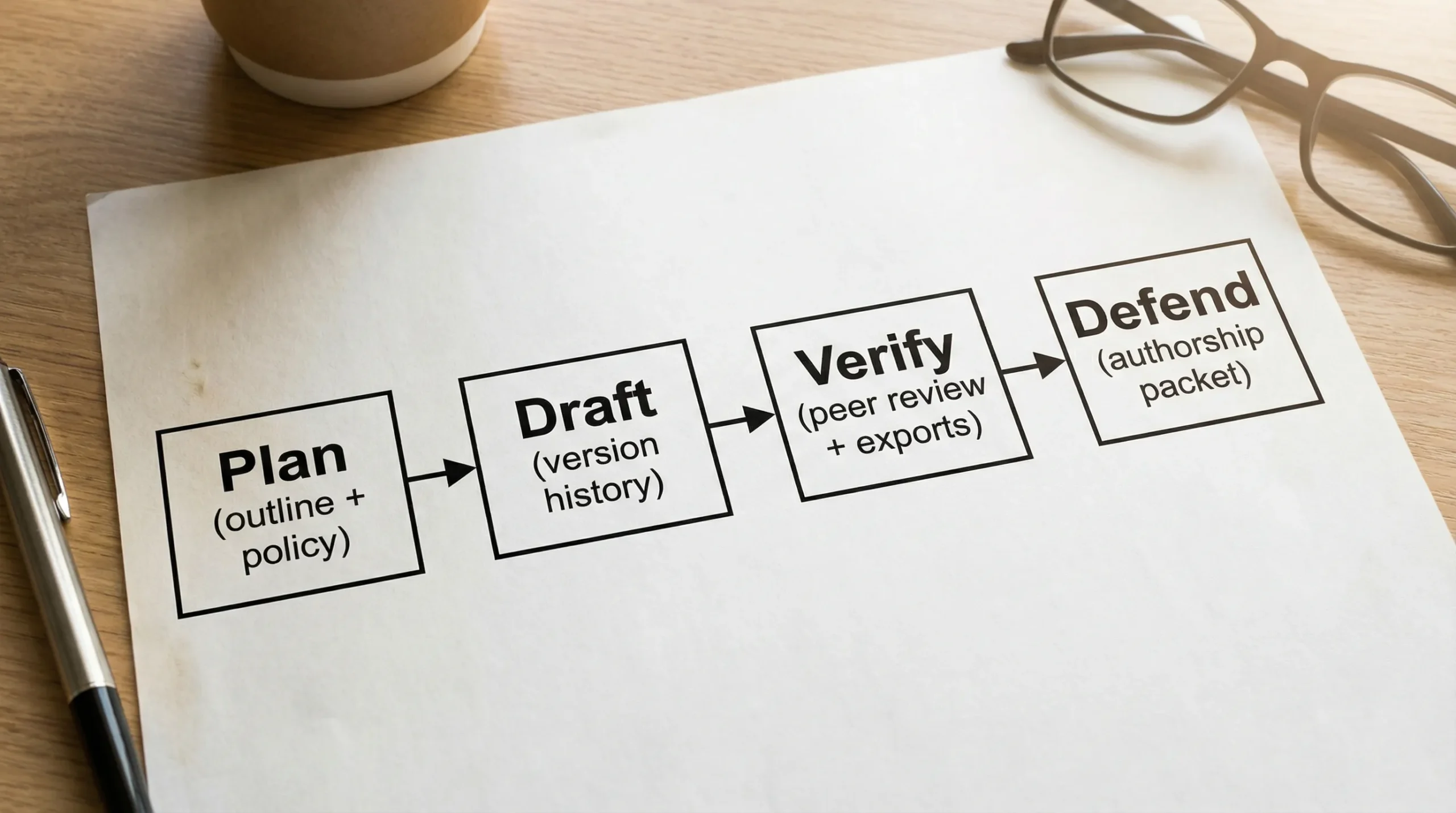
Step 4: build a lightweight “authorship packet” (30 minutes total)
If your project is high-stakes, prepare a folder you could share if questioned.
| Item | What it proves | How to collect it |
|---|---|---|
| Version history screenshots | Incremental drafting | Screenshot key timestamps and named versions |
| Early outline + notes | Planning before writing | Export outline doc or meeting agenda |
| Source trail | Research process | PDFs, links, Zotero/Refs export, annotated bib |
| Contribution log | Who did what | Table updated weekly |
| Meeting notes | Group decisions | Notes doc, agenda, action items |
| Draft exports | Evolution of text | PDF exports labeled by date |
This is the same concept Detection Drama recommends in other dispute scenarios, but tailored for group work: you want artifacts that show normal process, not just a final polished file.
If you suspect a teammate is using AI (what to do without blowing up the group)
This is the hardest situation because you also have deadlines.
A pragmatic approach:
- Ask for transparency, not confession: “Can you share your draft history or notes so we can merge smoothly?”
- Require section owners to submit their part in the shared doc, not as a pasted final block.
- If your course allows AI with disclosure, push for disclosure in the appendix now, not later.
- If your course bans AI drafting, propose a rewrite session where the teammate explains the ideas verbally and then rewrites in their own words.
If the teammate refuses to provide drafts or history, treat that as a risk signal. At that point, it can be reasonable to email the instructor early with a process question (“What documentation do you recommend for group work to avoid false flags?”). You are not accusing anyone, you are building a record that you acted responsibly.
If the submission gets flagged anyway: how to protect yourself fast
Group-project flags can feel unfair because you did not control every sentence. If it happens, speed and documentation matter.
1) Preserve everything immediately
- Duplicate the final doc and lock editing.
- Export the version history evidence (screenshots and named versions).
- Save chat logs or meeting notes that show drafting decisions.
2) Coordinate with your group on one clear narrative
Do not send four contradictory emails. Decide:
- Who communicates first
- What evidence you will offer
- Whether any tool usage needs disclosure (per policy)
If you need a time-boxed action plan, this internal guide is built for speed: Accused of AI use: what to do in the next 24 hours
3) Offer a fair verification method
Instructors and integrity offices often respond well to:
- A short process memo (what you did, when)
- Version history
- An oral walkthrough (each member explains their section and sources)
If your team can defend the ideas, the citations, and the drafting trail, an AI indicator is much less persuasive on its own.
4) Use a calm, evidence-first email
Keep it short. Avoid emotional language and avoid over-arguing about detector accuracy. Focus on process proof.
You can adapt this template:
Hello Professor [Name],
We saw that our group submission was flagged by the AI writing indicator. We understand this indicator is a signal that requires review, and we would like to share our drafting documentation.
We can provide version history, dated draft exports, our contribution log by section, and source notes showing how the paper was developed. We are also happy to meet and walk through our sections and sources live.
Please let us know what format you prefer for reviewing this documentation.
Thank you, [Names]
If you are dealing with a mid-range AI flag and need examples of proof that tends to work, see: Flagged 35% AI on Turnitin: what proof can clear you?
Quick checklist for group projects (print this in your doc header)
Use this as a final sanity check.
| Area | Green flag | Red flag |
|---|---|---|
| Drafting | Written in shared doc over time | Big pasted blocks near deadline |
| Ownership | Section owners + comments | “Everyone rewrote everything” |
| Evidence | Named versions + exports | No drafts, no notes |
| Style | Assignment-specific details | Generic textbook tone throughout |
| Tools | Light edits + disclosure if needed | Heavy rewriting without transparency |
Where Detection Drama fits (without risking an integrity violation)
Detection Drama exists because AI detection is messy, especially for students working collaboratively. If your concern is false positives or unintentional triggers, you can use the site to:
- Learn why Turnitin behaves differently than other tools: Why Turnitin flags AI when other detectors don’t
- Interpret scores correctly, especially similarity vs AI indicators: Turnitin AI % vs Similarity %
- Run quick, no-login analysis tools and read bypass discussions in context (use responsibly): DetectionDrama
If your institution prohibits AI-generated writing, the safest “protection” is not concealment. It is transparent process, documented drafting, and the ability to explain your work.
Group projects do not have to be a minefield. Once your team treats documentation as part of the assignment, Turnitin AI flags become a manageable risk instead of a sudden crisis.
