
Getting a Turnitin report that says “35% AI” can feel like an accusation, especially if you wrote the work yourself. The good news is that a mid-range AI score is not a conviction, and in many cases you can clear things up by presenting the right kind of evidence: proof of authorship process, not just a confident explanation.
Want to bypass Turnitin in 2026? Grab the free prompt pack.
Get the exact text-humanization prompts I use to drop an AI score by hand — copy, paste, submit. Free, straight to your inbox.
Send me the free prompts →This guide breaks down what a 35% AI flag usually means, what proof actually helps in an academic review, and how to present it in a way that is easy for an instructor (or integrity office) to verify.
What a 35% AI score on Turnitin actually means
Turnitin’s AI writing indicator is a prediction, not a forensic test. It estimates whether parts of the text look similar to patterns the model associates with AI writing. It does not prove how the text was produced.
A few key points that matter when you are defending yourself:
- AI score is separate from plagiarism. Plagiarism matching compares your text to existing sources. AI detection tries to guess how text was generated.
- Percentages are not “percent written by AI.” A 35% indicator typically means Turnitin marked some segments as more likely AI-generated, not that you used AI for 35% of your writing.
- Context matters. Short assignments, highly structured writing, generic phrasing, and heavily edited text can increase the likelihood of being flagged.
Turnitin itself emphasizes that AI detection should be used as one signal and must be interpreted with human judgment and process review. (See Turnitin’s documentation on its AI writing detection and educator guidance: Turnitin AI writing detection.)
Why “35%” is a common gray-zone number
In practice, mid-range scores are where misunderstandings happen most, because they can be caused by a mix of normal writing traits plus a few highlighted passages.
| Common reason for a mid-range AI flag | What it looks like in student work | Why it can trigger detectors |
|---|---|---|
| Very “clean” academic style | Even tone, polished transitions, few personal markers | Predictable phrasing and consistent cadence can resemble AI outputs |
| Formulaic sections | Definitions, background paragraphs, “In conclusion…” | Detectors often mark high-regularity text as suspicious |
| Heavy paraphrasing after research | Reworded summaries of sources | Paraphrased summaries can become generic and pattern-like |
| Over-editing with tools | Aggressive grammar rewrites | Some rewriting tools can flatten voice and make text more uniform |
| Reused scaffolding | Templates, lab report structure, business memo format | Structural similarity can raise “AI-likeness” signals |
If your instructor only saw the percentage and not your writing process, you are missing the most persuasive part of the story.
The proof that clears you (what instructors can actually verify)
When a student is flagged, the strongest defense is usually provenance: drafts, timestamps, and artifacts that demonstrate how the text developed.
Think of it like this: your goal is not to argue about the detector. Your goal is to show a believable, checkable creation trail.
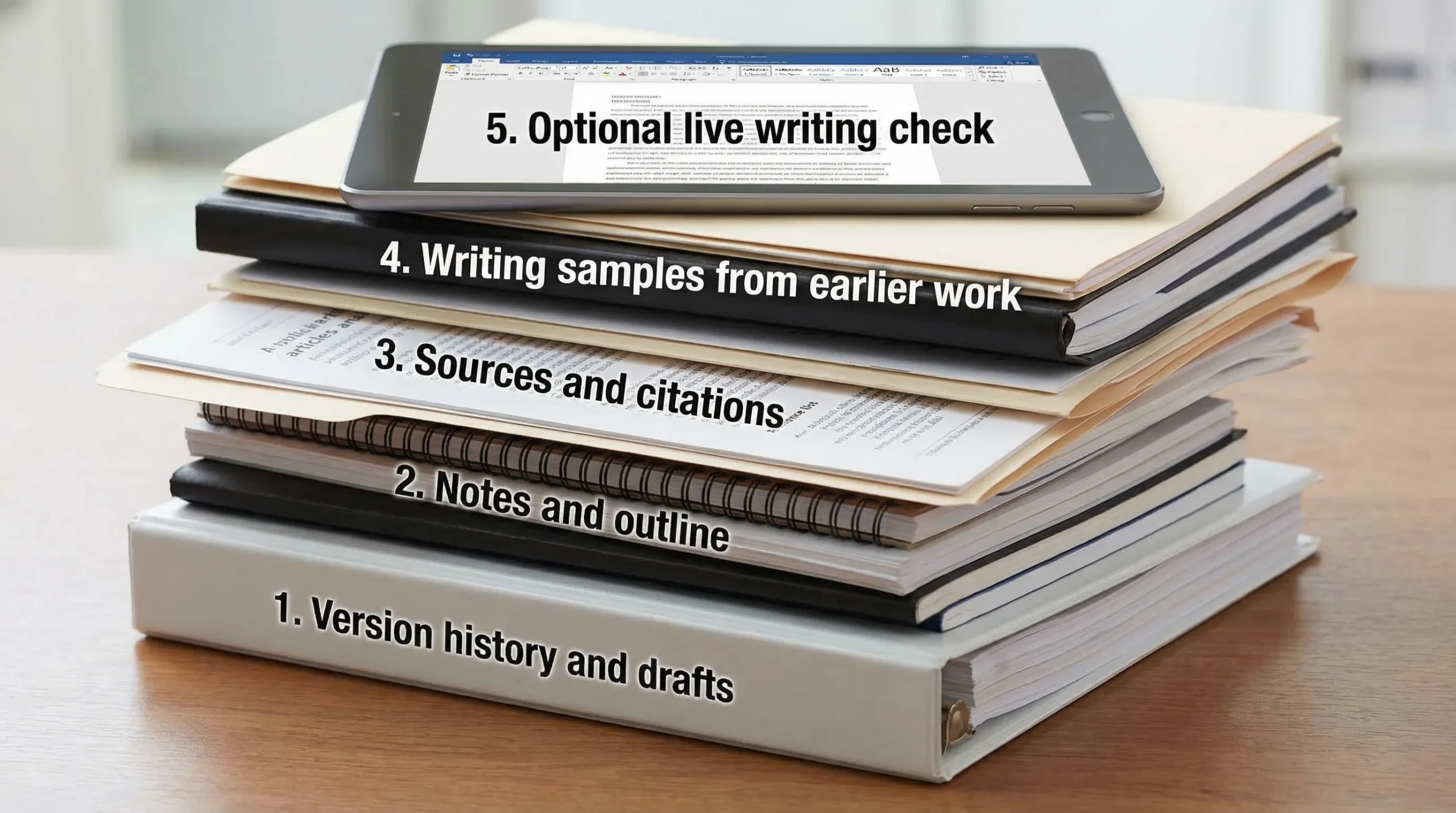
Evidence ranked by credibility
| Proof type | What it proves | How to collect it quickly | Typical strength |
|---|---|---|---|
| Google Docs / Microsoft 365 version history | Incremental writing over time (adds, deletions, revisions) | Export version history screenshots or share view access | Very strong |
| Draft files (multiple saves) | You produced evolving drafts (not a single paste) | Provide timestamps from files, uploads, or backup folders | Strong |
| Outline, brainstorming notes, scratch work | You planned and composed in stages | Provide notebook photos, Notion pages, OneNote, mind maps | Strong |
| Research trail (sources you opened and used) | You engaged with specific materials | Show annotated PDFs, citation manager library (Zotero, EndNote), reading notes | Strong |
| Edit history from peer review / tutoring | Humans reviewed and you revised | Email threads, tracked changes, writing center notes | Strong |
| Your prior writing samples | Consistency with your voice and competence level | Submit earlier essays, discussion posts, timed writes | Medium to strong |
| Optional live verification | You can reproduce the thinking on demand | Offer to write a short in-person response or explain sections orally | Strong (when accepted) |
The best package is usually version history + notes + research artifacts. That combination is hard to fake and easy to understand.
What to do first: ask for the highlighted AI report, not just the percentage
Before you assemble your evidence, you need to know what Turnitin actually flagged.
Ask your instructor (politely) for:
- The AI writing report view showing highlighted passages
- Whether the flagged text clusters in one section (often introductions, background, conclusions)
- Whether any passages were copied from your own previous work or common course materials
This matters because your defense should address the exact segments Turnitin marked, not the whole paper in general terms.
How to present your proof so it actually works
Many students lose disputes they could have won because they hand over a chaotic pile of screenshots. Make it easy to verify.
Build a 1-page timeline
Create a simple timeline that shows when you:
- Picked a topic
- Collected sources
- Built an outline
- Wrote the first draft
- Revised and finalized
Then attach supporting artifacts under each point (version history snapshots, outline file, annotated sources).
Provide “receipts” for the flagged sections
If Turnitin highlights specific paragraphs, connect them to your process:
- Show the draft where that paragraph first appeared
- Show revisions (what you changed and why)
- Show the source notes that informed it
This is far more persuasive than saying “I didn’t use AI” repeatedly.
Offer a quick verification option
If your instructor is unsure, offer one of these:
- A short meeting where you explain the argument and defend key claims
- A short in-class writing sample on a related prompt
- A brief “walkthrough” of your sources and how you used them
In integrity reviews, willingness to demonstrate competence often helps.
Email template you can send to your instructor
Use a calm, evidence-forward tone.
Subject: Question about Turnitin AI score on my submission
Hi Professor [Name],
I saw that Turnitin flagged my paper with an AI writing score (~35%). I’m concerned because I wrote the assignment myself, and I want to resolve any doubts.
Could you share which sections Turnitin highlighted as AI-generated (the report view or screenshots)? I can provide documentation of my writing process.
To help, I’ve already prepared:
- Document version history showing my drafting and revisions over time
- My outline and planning notes
- Research notes and annotated sources used for the flagged sections
If it helps, I’m also happy to meet briefly to walk through my argument and sources, or complete a short in-person writing sample.
Thank you, [Your name] [Course/Section]
If you used AI in any way, disclose it clearly (and show what you changed)
Some classes allow AI for brainstorming, outlining, grammar help, or citation formatting. Others forbid it entirely. If you used AI in a permitted way, disclosure can protect you.
What helps most is specificity:
- What tool you used
- What you used it for (outline, feedback, grammar)
- What you wrote yourself
- How you verified facts and sources
If your policy forbids AI and you used it anyway, this article cannot provide a “magic proof” that erases that. Your best move is to follow your institution’s process and be honest about what happened.
What not to do when you are already flagged
Certain reactions make the situation worse:
- Do not rewrite the entire paper and resubmit unless your instructor asks. It can look like you are trying to “launder” the draft after being caught.
- Do not rely on AI humanizers as a defense. Tools that attempt to bypass detection can escalate an integrity investigation, especially if metadata and version history show late-stage paste behavior.
- Do not argue the score in the abstract. “Detectors are inaccurate” may be true in general, but it is weaker than showing your actual drafting trail.
(If you want to understand how AI detectors behave, treat tools and tests as diagnostic only, not as a strategy for evasion. DetectionDrama publishes analysis and free tools for evaluating AI-likeness, but in an academic dispute, provenance beats tweaking text.)
How to reduce the chance of being flagged again (without changing your ethics)
Even if you wrote everything yourself, you can reduce risk by keeping a cleaner creation trail and writing with more authentic specificity.
Keep process evidence by default
- Draft in Google Docs or Microsoft 365 with version history enabled
- Save milestone drafts (v1, v2, final)
- Keep your outline and research notes in a dated folder
- Use a citation manager (like Zotero) and keep annotated PDFs
Write in a way detectors struggle to “stereotype”
This is not about tricking a detector, it is about demonstrating genuine thinking:
- Add course-specific details (lecture concepts, assigned readings, class examples)
- Explain decisions (“I chose this method because…”) instead of only summarizing
- Use precise claims and concrete evidence, not generic filler
- Avoid over-polishing every sentence into the same rhythm
If you use editing tools, be careful with heavy rewrites
Basic grammar support is usually fine, but aggressive rewriting can flatten your voice and make writing look more uniform. If you rely on tools, keep your earlier drafts and show your evolution.
Flagged 35% AI on Turnitin — Bottom line: the proof that clears you is — Flagged 35% AI on Turnitin What Proof Can Clear You
A Turnitin “35% AI” result is best treated as a prompt to verify authorship, not as a final verdict. In most real cases, the students who resolve these situations fastest are the ones who can produce:
- Version history (time-based drafting)
- Drafts and notes (idea development)
- Research artifacts (real source engagement)
- A clear timeline (easy to review)
If you gather those pieces and present them cleanly, you give your instructor something concrete to evaluate, which is often exactly what they need to clear you.
