
If you’re asking “does Turnitin detect AI or just guess patterns?” the most accurate answer is: Turnitin does not “see” where your text came from. It estimates likelihood based on patterns.
That distinction matters, because it changes how you should interpret the result. Turnitin’s AI indicator is best understood as a probabilistic classification signal, not a definitive fact, and it can be wrong.
What Turnitin is actually doing (detection vs “guessing”)
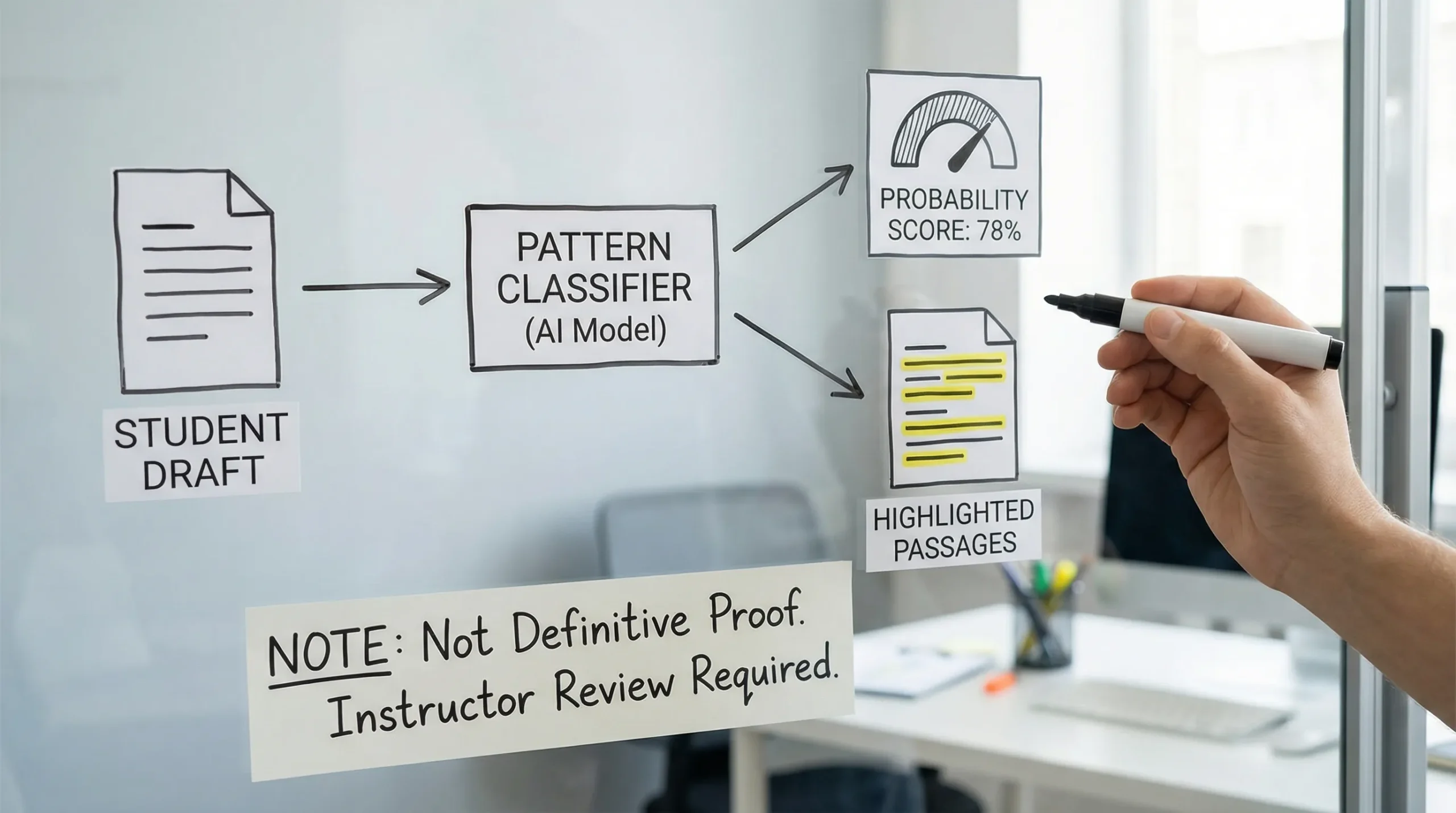
Turnitin’s AI writing indicator works like most AI detectors: it takes your submission and runs it through a model that has learned statistical differences between human writing and AI generated writing (as defined by its training data).
So yes, it is “detecting” in the machine learning sense. But it is also “guessing” in the plain English sense, because:
- It does not have a way to confirm your real writing process.
- It does not receive a “written by ChatGPT” label from Google Docs, Word, or your browser.
- It outputs a score based on signals that correlate with AI like text, not proof.
A useful analogy is spam detection. Spam filters do not know the sender’s intent, they classify messages based on features that commonly appear in spam.
What Turnitin can and cannot know
Many people assume Turnitin can “check ChatGPT logs” or identify the exact tool used. In typical classroom use, that is not how it works.
| Question | Reality (in most cases) |
|---|---|
| Can Turnitin read your ChatGPT conversation history? | No. |
| Can it identify the exact model (GPT-4.1 vs Claude vs Gemini)? | Not reliably, and it generally does not claim to. |
| Does it compare your text to a database of AI outputs? | AI detection is typically pattern-based classification, not a plagiarism style match. |
| Can it be confident sometimes? | Yes, especially when the text is highly formulaic and aligns strongly with AI-like signals. |
| Is it definitive proof of misconduct? | No, it is a signal that should be evaluated with context and corroborating evidence. |
For related nuance, see: Can Teachers See Your Real Turnitin AI Percentage? and Turnitin AI % vs Similarity %: What’s Actually Different?.
What “patterns” is Turnitin looking at?
Turnitin does not publish every feature it uses (and vendors keep details private to prevent gaming). But across AI detection research and vendor documentation, the common buckets of signals look like this:
| Signal bucket | What it means in practice | Why it can misfire |
|---|---|---|
| Predictability | Text that follows highly typical phrasing paths | Polished academic prose, templates, and “safe” wording can look predictable |
| Uniformity | Similar sentence lengths and paragraph rhythm | Careful editing or strict rubric-driven writing can look uniform |
| Low specificity | Generic claims, few concrete details | Early drafts, summaries, and high-level explainers often lack specifics |
| Over-structured flow | Very clean transitions and perfectly balanced paragraphs | Students trained on formulaic essay structures can trigger this |
| Limited personal footprint | Little evidence of lived experience, unique judgment, or messy thinking | Many legitimate assignments are impersonal by design |
This is why normal writing habits can trigger flags, even without AI use. If you want to audit your own draft for “AI-like” surfaces, this companion guide is helpful: Normal Writing Habits That Can Trigger Turnitin AI Flags.
Why Turnitin can flag content that other detectors don’t
A common experience is: GPTZero says “human,” Originality says “mixed,” but Turnitin flags sections.
That mismatch is not automatically a sign Turnitin is “better.” It often means the tools differ in:
- training data (academic vs web content)
- thresholds (how aggressive the flagging is)
- preprocessing (how they chunk text, normalize punctuation, treat citations)
- what they were optimized for (classroom triage vs publishing risk)
A deeper explanation is here: Why Turnitin Flags AI When Other Detectors Don’t.
Is the Turnitin AI score reliable enough to be used as evidence?
Used responsibly, Turnitin’s indicator can be a starting point for review, not an end point.
Two realities can coexist:
- Detectors can be accurate on some samples, especially heavily AI-generated, minimally edited text.
- Detectors can produce false positives, sometimes in the exact scenarios where students write “cleanly,” or where ESL writing patterns differ.
If you’re interested in the bias and false-positive side (especially for non-native English writers), this research-focused breakdown is worth reading: AI Detection Bias Against ESL Students: Research & Evidence (2026).
The practical takeaway: Treat it like a risk signal
Instead of asking “Is Turnitin detecting or guessing?” ask:
- What is the consequence of a false positive in this course or workplace?
- What is the policy on AI assistance (allowed, disclosed, prohibited, or undefined)?
- What supporting evidence can you provide about your process?
In other words, manage it like a high-stakes classifier: it can be useful, but it is not a verdict.
If you’re flagged: what actually helps (and what usually backfires)
When Turnitin flags a section, people often panic and start rewriting solely to push the number down. That can backfire, because it can destroy the evidence of your process.
What tends to help in real disputes
Process evidence is usually more persuasive than arguing about the detector.
- Version history (Google Docs or Word on OneDrive)
- Drafts and outlines with timestamps
- Research trail (sources, annotated PDFs, notes)
- A short timeline of how the work evolved
- Ability to explain and defend your reasoning live
These two guides walk through that in a structured way:
- Accused of AI Use: What to Do in the Next 24 Hours
- Is Google Docs or Word Version History Enough as Proof?
What often backfires
- “Fixing” the number repeatedly and submitting multiple radically different versions
- Running text through aggressive rewriters that distort meaning or citations
- Deleting drafting evidence, copying into a fresh doc, or removing comments
- Making absolute claims like “Turnitin is fake” instead of addressing the assignment and your process
If you used AI ethically, how to reduce false positives without cheating
There is a big difference between:
- using AI as a tutor (outline help, feedback, grammar support, brainstorming)
- using AI to generate the final submission with minimal original contribution
If your policy allows AI support (or is ambiguous), the safest approach is to increase your authentic authorship footprint:
- Add assignment-specific details (course concepts, lecture references, local context)
- Include your own reasoning steps (why you chose an approach, what you rejected)
- Integrate citations thoughtfully (and verify them)
- Vary rhythm naturally (not randomly), keep your voice consistent
- Keep evidence of drafting and revision
Note: tools like Grammarly can also affect the “polish profile” of text, which sometimes contributes to suspicion. If that’s your scenario, this guide may help: Grammarly Triggered Turnitin AI: How to Prove Authorship.
A simple framework for interpreting an AI indicator responsibly
Turnitin’s AI indicator is best treated as a triage signal. Here is a practical way to think about it:
| Situation | What it might mean | Best next step |
|---|---|---|
| Low or no AI highlight | Fewer AI-like signals, not proof of no AI | Still keep drafts for protection |
| Mid-range highlight (mixed passages) | Gray area, could be editing, templates, AI assistance, or false positives | Prepare authorship evidence and add specificity |
| High highlight across most of the document | Strong AI-like signal profile | Review policy, prepare a full process packet, be ready to explain choices |
If you’re in the gray area, this targeted guide is useful: Flagged 35% AI on Turnitin: What Proof Can Clear You?.
Frequently Asked Questions
Does Turnitin detect AI or just guess patterns? Turnitin “detects” AI in the sense that it uses a machine learning classifier, but it does not know your writing process. It estimates likelihood from patterns, so it is a probabilistic guess, not proof.
Can Turnitin prove I used ChatGPT? Not by itself. The AI indicator is not a forensic record of tool usage. In most cases, it cannot access your chat history or confirm authorship without additional context.
Why did Turnitin flag my writing if I didn’t use AI? False positives can happen when writing is highly polished, template-driven, generic, or when language patterns (including ESL writing) resemble what the model learned as “AI-like.”
Can I lower a Turnitin AI score by paraphrasing tools? Some tools can change the surface patterns, but chasing the score can create academic integrity risks, distort meaning, and remove evidence of your process. Focus on authentic revision, specificity, and documentation.
What is the best proof if I get accused? Version history, drafts, outlines, research notes, and the ability to explain your thinking. A clear process timeline is often more persuasive than arguing about detector accuracy.
Use Turnitin signals to write more authentically (not just “less detectable”)
Detection Drama publishes practical guides on AI detection limits, Turnitin score interpretation, and what to do if you’re flagged. If you’re trying to make AI-assisted text sound genuinely human (while keeping meaning intact), you can also use our free humanizer tool and AI authenticity analysis to spot overly uniform phrasing and improve readability before you submit.
Explore the tools and resources here: detectiondrama.com
