Turnitin can detect AI in a PDF, but only when the PDF carries a real, selectable text layer and at least 300 words of prose. A scanned or image-only PDF is rejected at upload, so no AI score is ever produced.
Want to bypass Turnitin in 2026? Grab the free prompt pack.
Get the exact text-humanization prompts I use to drop an AI score by hand — copy, paste, submit. Free, straight to your inbox.
Send me the free prompts →Key Takeaways
- Turnitin’s AI Writing Report accepts only four file types: .docx, .pdf, .txt and .rtf (Turnitin Guides).
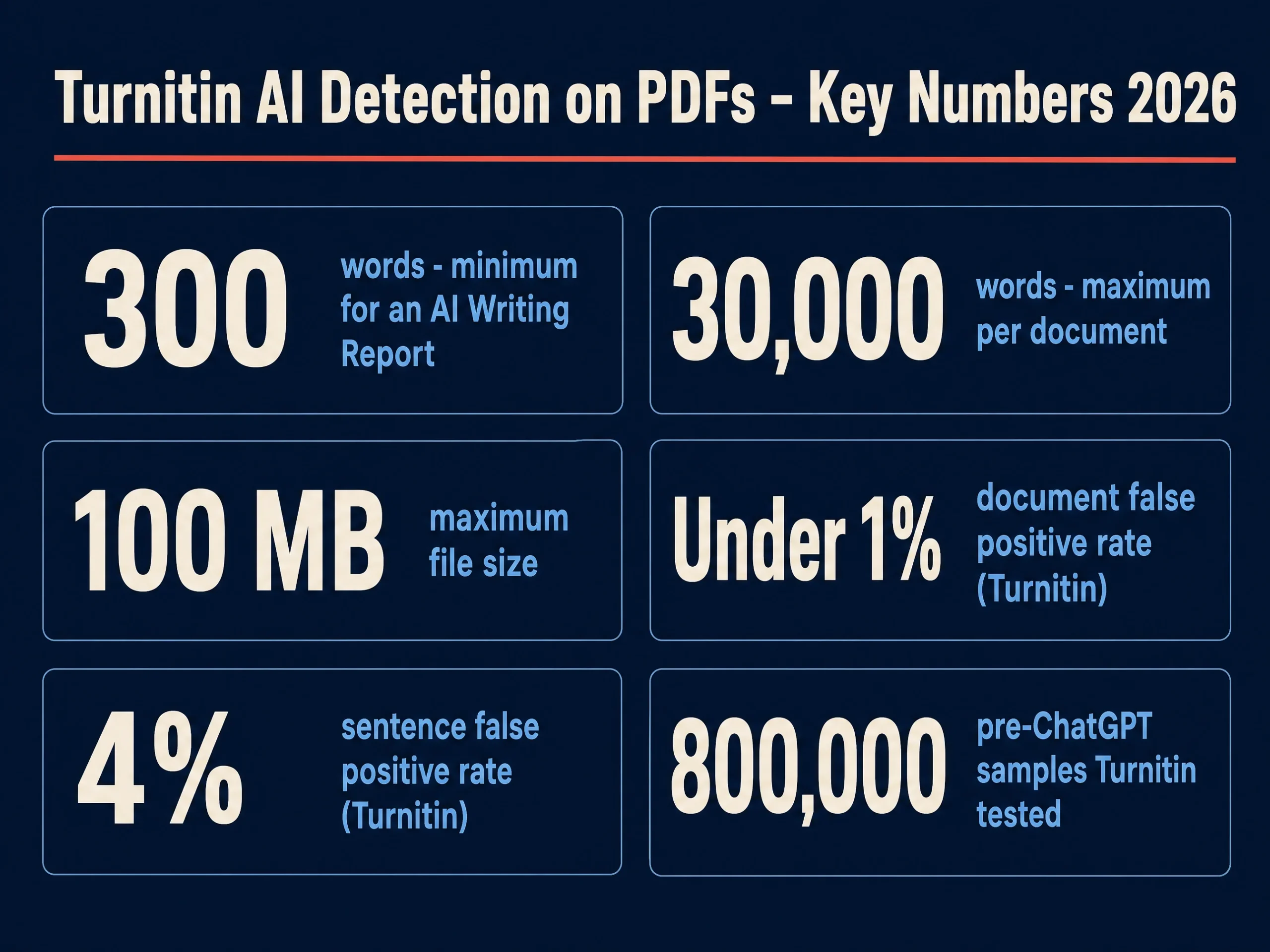
- The document needs 300 words minimum and 30,000 maximum of long-form prose. Turnitin raised the floor from 150 to 300 words because accuracy improved with more text.
- Turnitin rejects any file with no highlightable text, which is exactly what a scanned or image-only PDF is. It is not scored zero, it fails to process at all.
- Turnitin’s own published false-positive rates are under 1% at document level and around 4% at sentence level, on 800,000 pre-ChatGPT samples.
- Exporting the same words from Word to PDF does not change what the detector reads, because the detector reads the text layer either way.
- The peer-reviewed comparison that scored Turnitin highest still concluded no tool tested exceeded 80% accuracy overall.
Can Turnitin detect AI in a PDF?
Yes, with one condition that decides the whole answer: the PDF has to contain selectable text. Turnitin’s AI writing detection is a text model, not an image model. It reads the characters embedded in the file, and a PDF is simply one of the containers those characters can arrive in.
Turnitin lists exactly four file types for an AI Writing Report: .docx, .pdf, .txt and .rtf, per its file requirements for an AI Writing Report. PDF is on that list. So the format itself is never the obstacle.
The obstacle is what is inside it. That is where most of the advice circulating on this question goes wrong, and it is worth being precise about which of Turnitin’s pages says what.
Which file types does Turnitin’s AI writing detection accept?
Turnitin runs two separate checks on a submission, and they do not accept the same things. The similarity check takes a long list of formats. The AI Writing Report takes a much shorter one.
This distinction matters because a file can be accepted by Turnitin, generate a similarity score, and still return nothing useful for AI writing. Our breakdown of what separates the AI score from the similarity score covers why the two reports behave differently.
| Submission | Similarity check | AI Writing Report |
|---|---|---|
| Word (.docx) | Accepted | Accepted |
| PDF with a text layer | Accepted | Accepted |
| PDF that is a scanned image | Rejected, no highlightable text | Never reached |
| PowerPoint (.pptx) | Accepted | Not an accepted AI file type |
| Google Doc via Drive | Accepted | Converted, then treated as text |
| Under 300 words | Accepted | No report generated |
The same logic explains why slides and speaker notes behave differently, and why a paper written in Google Docs is treated as ordinary prose once it reaches Turnitin.
What happens to a scanned or image-only PDF?
It fails. Turnitin’s submission file requirements state that Turnitin will not accept “PDF image files, forms, portfolios, files that do not contain highlightable text (e.g., scanned documents that are images)”. A scanned essay is a picture of an essay, and there is nothing in it for the parser to read.
Turnitin gives a one-step test for this on the same page: copy a section of the content and paste it into a plain-text editor. If no text appears, the file has no selectable text and will not be accepted.
Worth being exact here, because the top-ranking pages on this question are not. The “no highlightable text” rule is published on the submission requirements page, not on the AI Writing Report page, which is silent on scanned PDFs. The practical result is the same, since an AI report can only run on a file Turnitin has already parsed, but Turnitin has not written that sentence anywhere.
What confirms it is classroom experience. A faculty member described the exact failure on r/Professors: “I ran into three or four students this term who consistently turned in PDF files that Turnitin couldn’t check. Every project they submitted received an ! on Canvas… It turns out if the student saves it as an Image PDF, turnitin can’t check it. Only a PDF with text.”
Why does Turnitin need 300 words?
Because short samples are where the model guesses. Turnitin’s Chief Product Officer, Annie Chechitelli, described the change in a Turnitin blog post: “Increasing the minimum word requirement from 150 to 300 words in order for a document to be evaluated by our AI writing detector… Results show that our accuracy increases with a little more text.”
There is a second restriction that catches people out. Turnitin states the model “does not reliably detect AI-generated text in the form of non-prose, such as poetry, scripts, or code, nor does it detect short-form/unconventional writing such as bullet points, tables, or annotated bibliographies.”
So a 5,000-word PDF that is mostly tables, code blocks and a reference list may contain far less eligible prose than its word count suggests. If you want the arithmetic on where scores land, our page on Turnitin AI score thresholds by university covers what different institutions treat as actionable.
How accurate is Turnitin’s AI detector on a PDF?
Format does not change accuracy, because by the time the model runs, the PDF has already become plain text. The accuracy question is therefore the general one, and Turnitin publishes numbers for it.
Turnitin states a document-level false positive rate of “less than 1%” for documents scoring over 20% AI, and a sentence-level false positive rate of “around 4%”, derived from putting 800,000 pre-ChatGPT academic writing samples through the detector. Turnitin also warns that below 20%, “there is a higher incidence of false positives”, which is why scores of 1 to 19% are displayed with an asterisk rather than a number.
Independent work is less flattering to the category as a whole. In the peer-reviewed comparison by Weber-Wulff et al. in the International Journal for Educational Integrity, 14 tools were run across 54 documents in 756 tests. Turnitin scored highest of the 14 and had the lowest false-positive rate in that sample, and the authors still concluded that all tools scored below 80% accuracy and “should not be used in academic settings”.
Emily Isaacs, who directs Montclair State University’s Office for Faculty Excellence, put the practical problem plainly to Inside Higher Ed: “With the AI detection, it’s just a score and there’s nothing to click. You can’t replicate or analyze the methodology the detection system used, so it’s a black box.”
If you are on the receiving end of a score you dispute, our false-positive checklist and the guide to what proof actually clears you are the two pages to read next.
Does saving as a PDF change your AI score?
No. Exporting a finished document from Word to PDF preserves the same characters in the same order, and the detector reads that text. The score you would get from the .docx and the score from its PDF export come from identical input.
What can change a score is editing during the export, which people sometimes do without noticing: dropping a section, adding an abstract, or pasting in a rewritten paragraph. Those are content changes, not format changes. Our explainer on whether Turnitin detects AI or reads patterns covers what the model is actually responding to.
What should you check before submitting a PDF?
Four things, in order, and all of them take under a minute.
- Select the text. Open the PDF, drag across a paragraph. If nothing highlights, it is an image and Turnitin will reject it.
- Count your prose. Under 300 words of continuous prose means no AI report, regardless of total page count.
- Check the file size. Turnitin’s limit is 100 MB, which scanned image PDFs blow through easily.
- Re-export rather than re-scan. If you printed and scanned a document, export it again from the original file instead.
If you want a sense of your risk before the real submission, see the best pre-submission check for Turnitin AI risk and how to check without a Turnitin account. Neither will reproduce your institution’s number exactly, and our page on what teachers actually see explains why.
Get the free text-humanization prompts
Get the exact text-humanization prompts I use to drop an AI score by hand — copy, paste, submit. Free, straight to your inbox.
Free · No credit card · Straight to your inbox
